
AI assistant for government agencies
Seven products sharing one repository, one permission model and one audit trail. Installed on your servers, with data that never leaves your infrastructure.
Start small, expand later
Deploy one product to prove the value, then add others on the infrastructure you already have.
Data flows between products
The output of one product is the input of the next, without manual re-entry.
One permission model, one audit log
Grant access once and trace activity in one place, instead of managing seven separate systems.
Why a platform rather than seven separate products
You could buy a separate product for each problem. But buying separately creates a different problem: seven repositories, seven user lists, seven permission models, and none of them talking to each other.
- Documents digitised in one product cannot be read by the search product
- Tasks extracted from meeting minutes have to be retyped into the tracking system
- A separate account per product, and staff juggling several passwords
- Tracing who viewed which document means checking seven places
How a shared platform resolves that
A document that has just been digitised is immediately available for search. A task just extracted from meeting minutes is already in the tracking list. An officer granted access once has it across the platform, and every action lands in the same audit log. You can start with one product and add more later — the second one costs far less to deploy than the first, because the infrastructure and permissions already exist.
What you gain
Help organisations process documents, manage tasks, consolidate reports and use their internal data quickly, with evidence and under control.
The platform accepts
- Electronic documents, Word and PDF files
- Scanned paper records
- Meeting audio recordings
- Excel reports submitted by units
- Data from your existing document management system
The platform provides
- Seven business products on one shared foundation
- A central document repository and search index
- Five permission dimensions: user, role, unit, repository and sensitivity level
- Permissions applied before retrieval: documents above your clearance never appear in results, not even as an excerpt
- A tamper-evident audit log built on a hash chain — who did what, when
- Integration with your existing document and operations systems
- Operation on a LAN or a dedicated network
Deployment path
- 1Survey the current situation and infrastructure
- 2Trial run on your real data
- 3Pilot in one department
- 4Configure to your processes and templates
- 5Hand over, train, and expand gradually
What you get
- Incoming documents classified with a suggested routing path
- Tasks with owners, deadlines and reminders
- Draft reports in your template, with conflicting figures flagged
- A full-text searchable document archive
- Answers with numbered citations pointing to the exact document and passage
- Meeting minutes in the Decree 30 template, plus the list of assigned tasks
Governance rule
Across the whole platform the AI only produces proposals and drafts. No result automatically becomes an official document — there is always an officer review-and-confirm step first. Question answering adds three guards against fabrication: if no sufficiently relevant document is found the system says so plainly instead of composing something plausible; every statement in an answer must be traceable to a source; and a post-check re-verifies the citation numbers. Each answer carries a reminder to check the original document before official use.
The seven products in the platform
Each product solves one specific problem officers currently lose the most time to. Which one you deploy first is up to you.
Everyday casework
Four products covering the document — task — report chain. This is where most organisations start.
Intelligent document management
Read, classify and route incoming documents the moment they arrive.
Read moreTask and directive management
Extract tasks from directives and track them through to completion.
Read moreAutomated report consolidation
Gather figures from many units and draft the report to your own template.
Read moreData checking and reconciliation
Catch conflicting figures, unsupported claims and duplicates before issue.
Read more
Getting data into the system
Turn paper files and audio recordings into digital data the products above can work with.
Using the archive
Ask questions in plain language across everything loaded into the platform.
The concrete change
The same work, before and after
This is not AI replacing officers. It is officers dropping the mechanical part and keeping the part that needs human judgement.
An incoming document arrives
How it works todayRead the whole document before you know its subject area, who handles it and when it is due.
With the softwareThe information sheet and a suggested handling unit are already there. The officer checks and confirms.
After a meeting
How it works todayThe secretary takes notes during the meeting, then spends hours writing up the minutes.
With the softwareTranscript, summary and a draft of the minutes are ready. Tasks are already extracted.
Producing the monthly report
How it works todayOpen each unit’s file, copy the figures across, cross-check by eye.
With the softwareThe draft has the figures grouped by template. Anywhere the numbers disagree is already flagged.
Finding an old regulation
How it works todayDig through folders, open files one by one, or ask a long-serving colleague.
With the softwareAsk one question in plain language and get an answer with the document number and page.
Who it is for
Where organisations like yours usually start
Nobody deploys all eight products at once. Here is the starting point we usually recommend by organisation type.
Provincial departments
High document and report volume, with many subordinate units submitting figures each cycle.
Usually starts with
Automated report consolidation and internal knowledge retrieval
District and ward authorities
Small teams, frequent meetings, and daily face-to-face contact with citizens.
Usually starts with
Meeting transcription and the public-service kiosk
Public service units
Years of accumulated paper records that must be digitised before they can be used.
Usually starts with
Document digitisation and OCR
Organisations with strict security requirements
Data is not permitted to leave the internal network, not even for processing.
Usually starts with
Internal knowledge retrieval on private infrastructure
Expected outcomes
What each group of users gains
How much improves depends on document volume, input data quality and each organisation’s own processes. We do not promise a single headline number.
For leadership
- A fast view of how assigned tasks are progressing
- Early sight of work that is late or overdue
- Consolidated figures with references to their sources
- Less waiting for reports from subordinate units
For officers
- Less time spent reading and classifying documents
- Fewer manual copy-and-consolidate steps
- Faster document retrieval
- Fewer missed tasks and deadlines
For the organisation
- A standardised information-handling process
- Better traceability
- Better control over data
- Better use of the existing document archive
Four core processing flows
All four share one property: the officer confirmation step always precedes the step that produces an official result. This is a design constraint, not a configuration option.
Document processing
- 1Receive
- 2Recognise content
- 3Extract information
- 4Classify by subject area
- 5Suggest routing
- 6Officer confirms
- 7Forward to unit
Task processing
- 1Receive the directive
- 2Extract individual tasks
- 3Identify unit and deadline
- 4Officer reviews
- 5Assign the task
- 6Track and remind
Report consolidation
- 1Collect documents for the period
- 2Recognise content and figures
- 3Group by template
- 4Reconcile and flag
- 5Produce a draft
- 6Officer finalises and issues
Internal question answering
- 1User asks a question
- 2Check permission scope
- 3Retrieve related documents
- 4Compose the answer
- 5Attach source references
- 6Officer verifies
Security and AI governance
This is the section we get asked about most, so we answer it before you have to ask.
Internal government records are not the kind of data you can put on a public AI platform. That is not a technical preference of ours — it is a hard constraint our customers operate under. Everything below follows from that constraint, rather than being a security layer bolted onto a product that was designed for the cloud.
On-premises deployment model
These four points are architectural commitments, not configuration options.
- Installed on the organisation’s own servers
- Operates on a LAN or a dedicated network
- Core functions do not use public AI APIs
- Data never leaves infrastructure the organisation controls
Six pillars of data protection
Running on-premises is necessary but not sufficient. A server in your own room still leaks if permissions are loose.
Data encryption
Data is encrypted both in transit and at rest, with tight access control in both directions.
Granular permissions
Role-based permissions following the principle of least privilege, controlled feature by feature.
Audit logging
Every significant action is recorded, supporting inspection and security review when needed.
Backup and recovery
Layered automated backups with fast restore, keeping the system continuously available.
Continuous monitoring
Activity, performance and capacity are monitored, with early alerts for anomalies.
Privacy protection
Compliance with personal data protection rules and a commitment never to use your data for other purposes.
Five permission dimensions
The five dimensions stack. An officer may be able to see their own department’s repository yet still be unable to open a document above their sensitivity clearance.
- 1By user
- 2By role
- 3By organisational unit
- 4By document repository
- 5By information sensitivity level
What the audit log records
When something goes wrong, the first question is always "who did what, and when". The log is designed to answer exactly that.
- Sign-in
- Search
- Document viewing
- Editing
- Downloads
- Approvals
- Configuration changes
Compliance and standards
The regulatory frameworks the system is designed to meet.
Decree 13/2023/ND-CP
Vietnam’s regulation on the protection of personal data.
ISO/IEC 27001
The international standard for information security management systems.
GDPR
The European data protection regulation, where the data in scope makes it applicable.
Rules governing AI-generated results
The real question is not "can the AI be wrong" — every AI is sometimes wrong. The question is what happens when it is. Our answer: nothing happens, because its output was never the final result.
The AI
- Assists with search
- Assists with extraction
- Assists with classification
- Assists with consolidation
- Assists with drafting
- Assists with flagging issues
The officer
- Checks the sources
- Checks the content
- Checks the figures
- Edits the result
- Confirms before use
Leadership
- Reviews the consolidated result
- Approves the content
- Decides on use and issue
Results produced by the AI do not automatically become official results, and do not replace the accountability of the officer, the unit or the authorised decision-maker.
Limits and conditions of use
This section does not usually appear on a product page. We include it because finding this out after signing a contract is far worse than knowing now.
Input data quality
Results depend on how legible the documents are, how complete the data is and how well-structured the source reports are. No software reads a blurred scan correctly.
Business rules
The system must be configured to your own processes and templates before production use. That is real work, it takes time, and it is not "install and run".
Accuracy
We do not promise a single accuracy figure across all document types. Anyone quoting you one without having seen your data has no basis for it.
Review responsibility
The responsible officer must check results before they are used in casework or in an issued document. The software does not assume that responsibility.
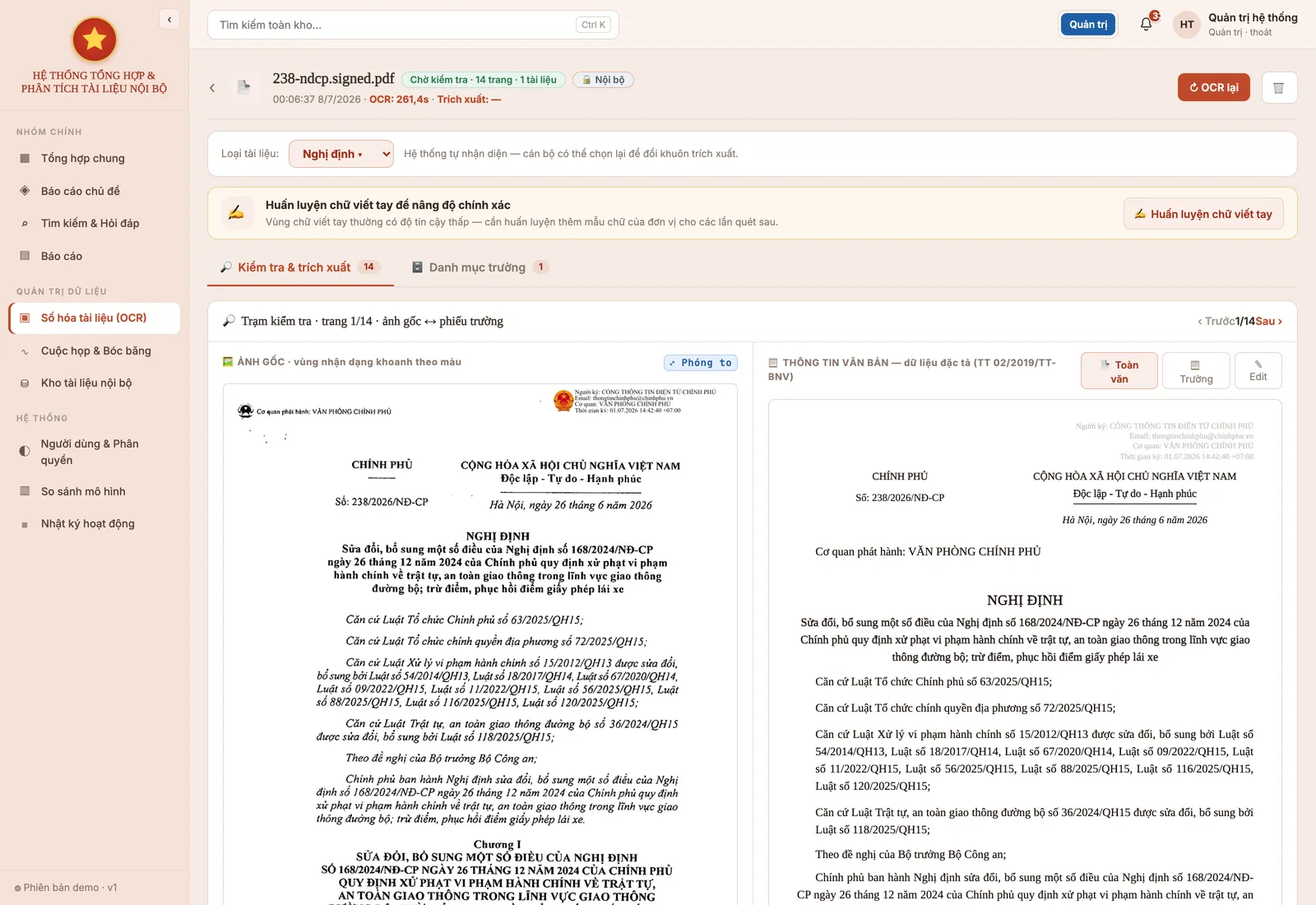
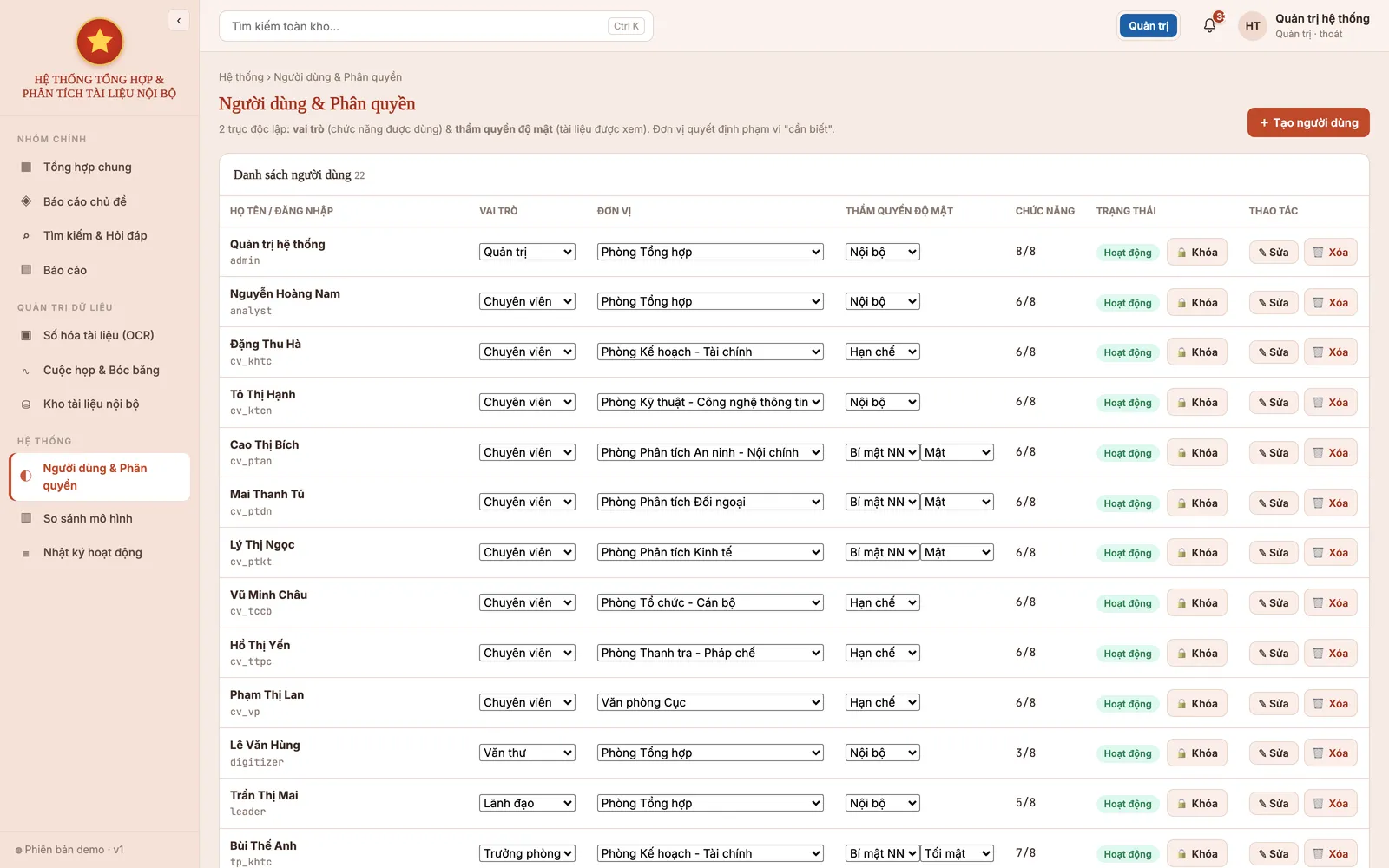
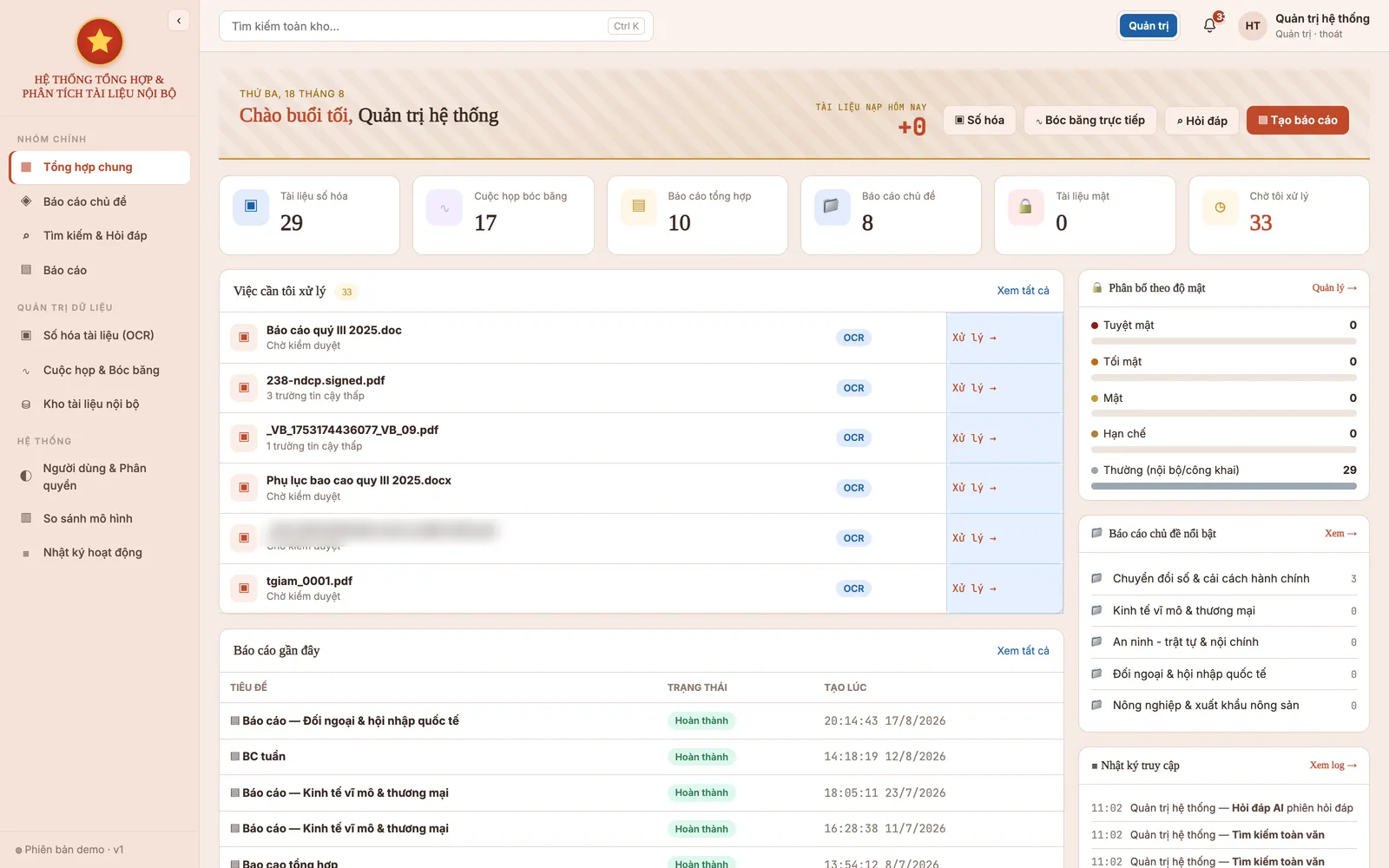
The real interface
Screenshots from the running system, not mock-ups. Documents shown are public legal texts or sample data.
Frequently asked questions
- Do we have to deploy all seven products?
- No. Most organisations start with one or two that address their most pressing problem, then expand once the value is proven. Because they share infrastructure and permissions, adding a product later is far simpler and cheaper than the first deployment.
- Does the platform replace our document management system?
- No. It connects to your existing system through an API or an authorised database connection and adds the reading and processing layer. You keep what you have already invested in.
- Does any data leave the organisation?
- No. The AI models, the document repository and the databases are all installed on servers at your premises. Core functions do not call public AI APIs, and the system runs on dedicated networks with no Internet access.
- Will older staff who are not comfortable with technology be able to use it?
- The software is designed around actions officers already know: open a document, check it, click confirm. The hard part — reading and extracting information — is done by the machine; the officer reviews. For search, users type a question in ordinary language with no syntax to learn. Training is included at handover, and we always recommend starting with one small department so staff can adjust gradually.
- What if we do not have powerful servers?
- At pilot scale for one department or one ward, the components can be consolidated onto one or two servers. The expensive part is the GPU for AI processing, and how much you need depends on concurrent users. During the survey we look at your existing infrastructure first and then propose a configuration — sometimes existing servers can be reused, sometimes new investment is required. We say which upfront rather than letting it emerge mid-project.
- How is the cost calculated?
- Cost depends on how many products you deploy, user numbers, the volume of documents to digitise and your existing infrastructure. That is why we do not quote before a survey — a number given without knowing your situation has nothing behind it. What we recommend is starting with a narrow pilot at a defined cost, measuring real results, and only then deciding whether to expand.
See it run on your own documents
Every solution sounds good in a description. The only way to know whether this one works for you is to run it against your real documents, templates and workflows. That is exactly the kind of demo we do.
The demo is free and carries no obligation. If it turns out we are not the right fit, we will say so.