
Public-service kiosk assistant
Citizens find their procedure, get walked through the online form field by field, and take a queue ticket on the spot.
Fewer repeat trips for citizens
Knowing what to bring means most cases are resolved in a single visit.
Less load on counter staff
The kiosk answers the repetitive questions so officers can focus on processing cases.
Information always matches regulation
Document lists and fees come verbatim from the administrative procedure dataset; the AI cannot alter them.
Nobody left behind
It listens and speaks in Tay using recordings by native speakers, so it serves people who are not comfortable with smartphones.
A familiar scene at the one-stop desk
Citizens arrive without knowing what to prepare, find out at the counter that something is missing, go home to fetch it and come back. Meanwhile officers answer the same questions all day.
- Citizens do not know the official name of the procedure they need
- Missing paperwork is discovered at the counter, forcing a second trip
- They do not know how to fill in the online form and abandon it halfway
- Officers spend significant time answering repeat questions
- Older people and those unused to smartphones struggle most
What changes after deployment
The kiosk sits at the one-stop desk and does three jobs. First, find the right procedure: the citizen speaks or types in everyday language — "I want to register a motorbike", "my licence is about to expire" — with no need to know the official name, and typing without diacritics works. Second, fill the form: the kiosk opens the actual National Public Service Portal form on screen, highlights each field, says what goes in it and warns about the fields people commonly get wrong. Third, take a number: pick the counter for your area and the machine prints a queue ticket on the spot. It speaks and listens in both Vietnamese and Tay.
What you gain
Placed at the one-stop service desk, it tells citizens exactly which documents they need before they reach the counter — cutting repeat trips caused by missing paperwork and reducing the questions officers answer repeatedly.
A citizen can
- Type their need in everyday language, without knowing the official procedure name
- Speak in Vietnamese or Tay instead of typing
- Pick from suggestions that appear while typing
- Type without diacritics and still find the right procedure
- Select their own case when a procedure has several variants
Core functions
- Search 32 administrative procedures across 8 areas handled by commune police
- Ask a clarifying question when the request is ambiguous
- Put the most common variant first when several options match
- Show a simplified, easy-to-read list of required documents
- Display a QR code linking to the National Public Service Portal
- Show additional documents required in special cases
- Direct citizens to the right place for matters outside the one-stop desk
- Open the Public Service Portal form, highlight each field and say what goes in it
- Warn about the fields citizens most often get wrong
- Issue a queue number by counter and print a paper ticket on the spot
- Bilingual Vietnamese – Tay interface, Tay voice recorded by native speakers
- Read ID cards, scan and print at the machine — no need to bring scanned files
How it is used
- 1The citizen types or speaks their need
- 2The system suggests options and asks if anything is unclear
- 3The correct procedure is confirmed
- 4The list of required documents appears
- 5The citizen scans the QR code or selects a special case
- 6The online form is filled in on screen, field by field, with prompts
- 7The citizen picks a counter and receives a printed queue ticket
Outputs
- The list of documents required for the correct procedure
- Fees and processing time
- A QR code linking to the National Public Service Portal
- Directions to the correct agency for out-of-scope matters
- A printed queue ticket with a QR code and the time of receipt
- In live use at commune police one-stop desks in two northern mountain provinces
Governance rule
Required documents, fees and QR codes are printed verbatim from the administrative procedure dataset and the AI is not allowed to alter them. The AI only rephrases wording for clarity. If the AI fails, the system falls back to fixed templates and the citizen still sees the full information. Because the machine stands in a public place, a session wipes itself after 60 seconds without interaction — the next person cannot see the previous one.
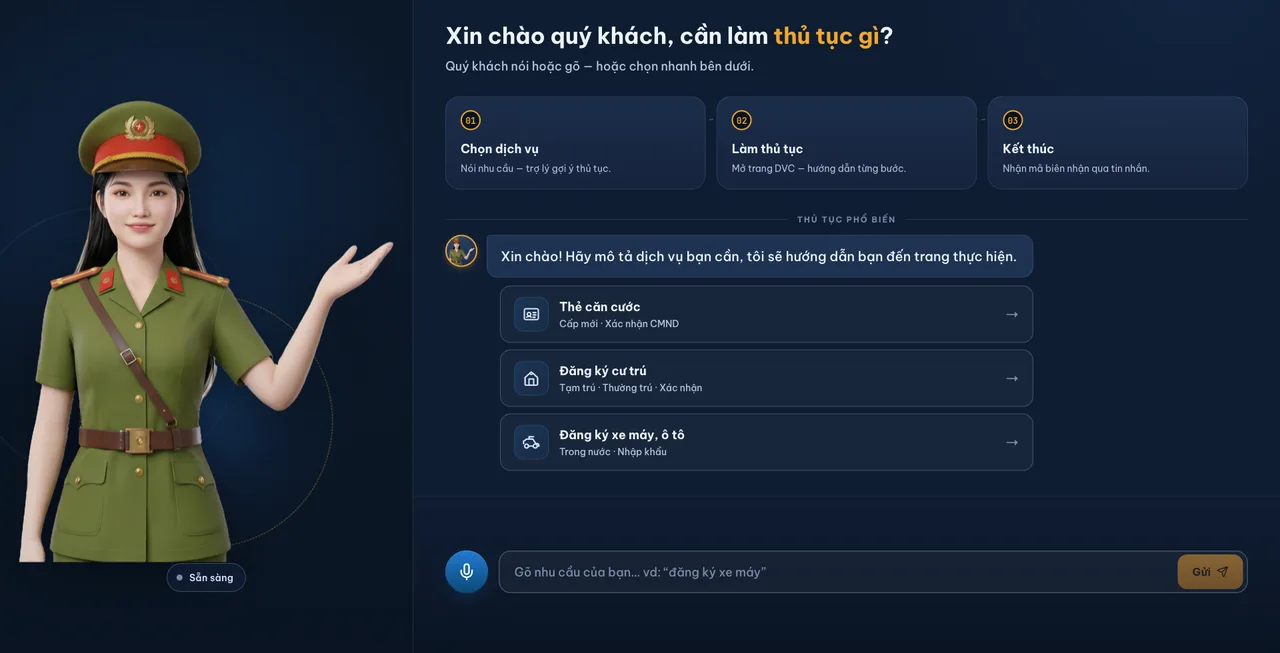
The real interface
Screenshots from the running software, not mock-ups. The agency name shown on the machine is configurable per commune.



Frequently asked questions
- If the AI gets something wrong, could a citizen be misinformed?
- No, because the part that matters is not decided by the AI. Document lists, fees and QR codes are printed verbatim from the administrative procedure dataset. The AI only phrases the surrounding sentences. If it fails, the system uses fixed templates and the citizen still receives the full information.
- How are updates handled when a procedure changes?
- The procedure dataset is configuration and can be updated without changing the software. When documents or fees change, only the data is updated.
- What hardware is required?
- A touchscreen kiosk at the one-stop desk. The deployed build adds an ID card reader, a document scanner and a thermal printer for queue tickets, so a citizen can complete the whole file at the machine without bringing scanned copies. The software runs in a browser, so hardware requirements are modest.
All solutions
See it run on your own documents
Every solution sounds good in a description. The only way to know whether this one works for you is to run it against your real documents, templates and workflows. That is exactly the kind of demo we do.
The demo is free and carries no obligation. If it turns out we are not the right fit, we will say so.